How to review H1–H6 headings
- Choose From URL for a public page, or Paste text for a single H1 string.
- Enter the URL or the heading copy, then choose Check Headings.
- In URL mode, start with
H1-H6 outline,Empty headings, andSkipped downward levels. - Read the H1 wording checks and the
Heading outlinelist. The score label isH1 guidance /100, not an SEO verdict.
Reading your results
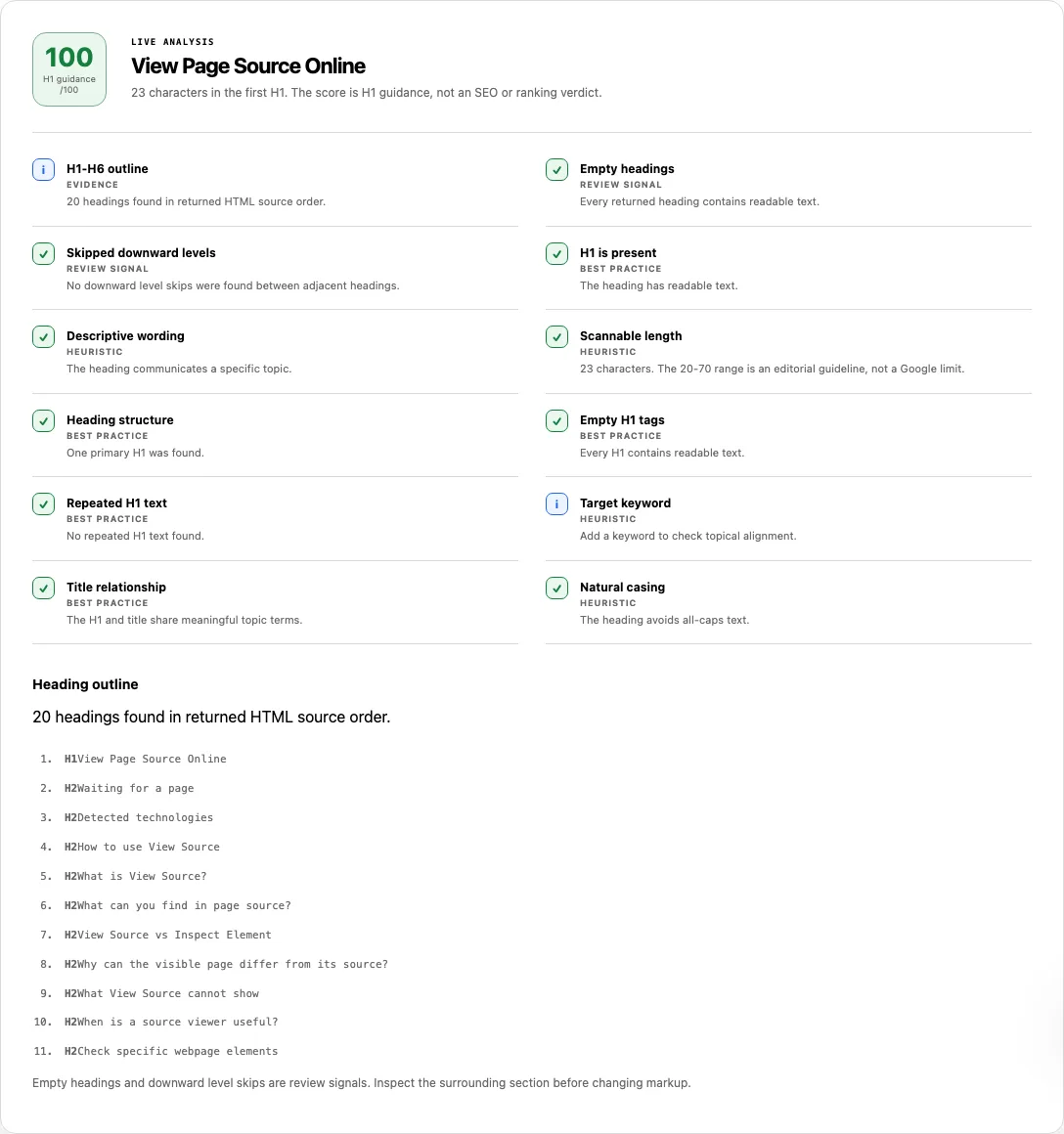
URL mode builds an outline of h1–h6 elements in returned HTML source order, including headings that sit in hidden UI.
H1-H6 outlinecounts those elements.Empty headingsandSkipped downward levelsare review signals. The footnote reads: “Empty headings and downward level skips are review signals.”- H1 checks:
H1 is present,Descriptive wording,Scannable length(20–70 characters is an editorial guideline, not a Google limit),Heading structure(several H1s are valid HTML; one primary heading is clearer),Empty H1 tags,Repeated H1 text,Target keyword,Title relationship, andNatural casing.
Paste mode prints this note: “Paste mode reviews the H1 text you provide. It does not parse an HTML document or produce an H1-H6 outline.”
What the homepage outline actually contains
A URL check of https://solviewer.site/ includes the article H1 “View Page Source Online”. It also includes headings that ship in the tool chrome, such as “Waiting for a page”, because those nodes are in the returned HTML. The outline is source order of the document, not a cleaned visual map of the article alone.
Common problems and fixes
- Another tool called several H1s an SEO error. HTML allows more than one H1. This report uses warn on
Heading structurewhen the count is not one. It is a clarity note, not a ranking fail. Keep a clear primary topic; do not delete valid region headings just to chase a count of one. - Paste text did not list H2–H6. That mode never parses a document. Switch to a public URL when you need the outline.
- A heading you cannot see still appears. Source order includes hidden chrome, skip links, and empty states. Change the markup that was returned, not only the painted layout.
- A skip from H2 to H4 looks like a penalty. The skip flag asks whether the H4 belongs under a missing H3. It is not proof that Google will demote the page.
- A visible title is missing from the list. Styled text that is not an h1–h6 element is ignored. Headings injected after JavaScript also stay out of a returned-HTML outline.
- Empty H1 tags fail. Put readable text in the element, or remove the empty tag so assistive tech is not announced a blank section.
Source-order outline versus a pasted H1
URL mode walks every h1–h6 node in the document as serialized. That is why a marketing H1 and a dormant “Waiting for a page” heading can sit in the same list. Paste mode never builds that list; it only reviews the string you typed.
If you need the surrounding markup for a surprising heading, open View Source and search for the text. A wider on-page pass belongs in the SEO Checker.
How this check works
For a URL, we parse the returned HTML and collect h1–h6 in document order. Empty nodes and downward level skips are flagged as review signals. The first H1, plus any extra H1 text, feeds the wording checks and the H1 guidance /100 score. URL mode follows the fetch behavior described on About.
We do not claim a Google ranking rule for heading counts. Use the outline to judge whether section labels match the content a person would scan.
Frequently asked questions
Can a page have more than one H1?
Yes. Multiple H1 elements are valid HTML. This checker warns so you can confirm there is still a clear primary topic. It does not treat a second H1 as a ranking error.
Do skipped heading levels hurt SEO?
Skipped levels can make the outline harder to follow, especially for assistive technology. This tool flags them for review. It does not assign a ranking penalty.
Does fixing headings guarantee ranking gains?
No. Clearer section labels help readers. They do not guarantee a better position in search results.
What does Paste text actually check?
Only the H1 wording you supply: presence, length band, casing, and optional keyword overlap. It will not emit an H1–H6 outline.
Related tools
- View Source — inspect the heading tags in the returned markup.
- SEO Checker — see headings beside title, canonical, and other on-page signals.
- XML Sitemap Checker — confirm listed URLs are the pages whose outlines you intend to keep.
Public URL requests follow the shared fetch limits on the About page.