How to test robots.txt for a URL
- Choose From URL for a live origin, or Paste content to review a file you already have.
- For a live test, enter the page address and pick a crawler: Googlebot, Googlebot News, Googlebot Image, Googlebot Video, Google Inspection Tool, Bingbot, YandexBot, or Any crawler (fallback).
- Run Robots.txt Checker. URL mode rewrites the request to origin
/robots.txt. - Read the file checks first, then the advanced client-side test, which shows whether the selected crawler may fetch your URL.
Reading your results
Live checks start with the HTTP status of the robots.txt response (for example HTTP 200), then Plain-text response and UTF-8 decoding. An HTML body where a robots file should be is a delivery problem, not a set of crawl rules.
Crawler groups counts User-agent blocks. Broad root disallows flags a Disallow: / on a group; a more specific Allow can still permit a path. Sitemap references lists Sitemap lines. Sitemap scan is a bounded look at those files when the live check can reach them.
REP syntax reports invalid or misplaced lines. Google file-size limit is 500 KiB; bytes after that cutoff are ignored to match Google processing. Google-supported fields notes extension fields such as Crawl-delay, which Google ignores.
The advanced client-side test gives a one-line verdict such as Allowed for Googlebot or Disallowed for Bingbot. Applied rule prints Allow: path (line N), Disallow: path (line N), or No matching rule. Matched group names the group that supplied the rule. The note under that block is: “This is a local REP rule simulation…”
Parsed file lists Crawler groups, User-agents, Allow / Disallow, and Sitemaps. A 4xx status other than 429 is treated as a missing file and unrestricted crawling, following Google. A 5xx status is a server error.
Worked example
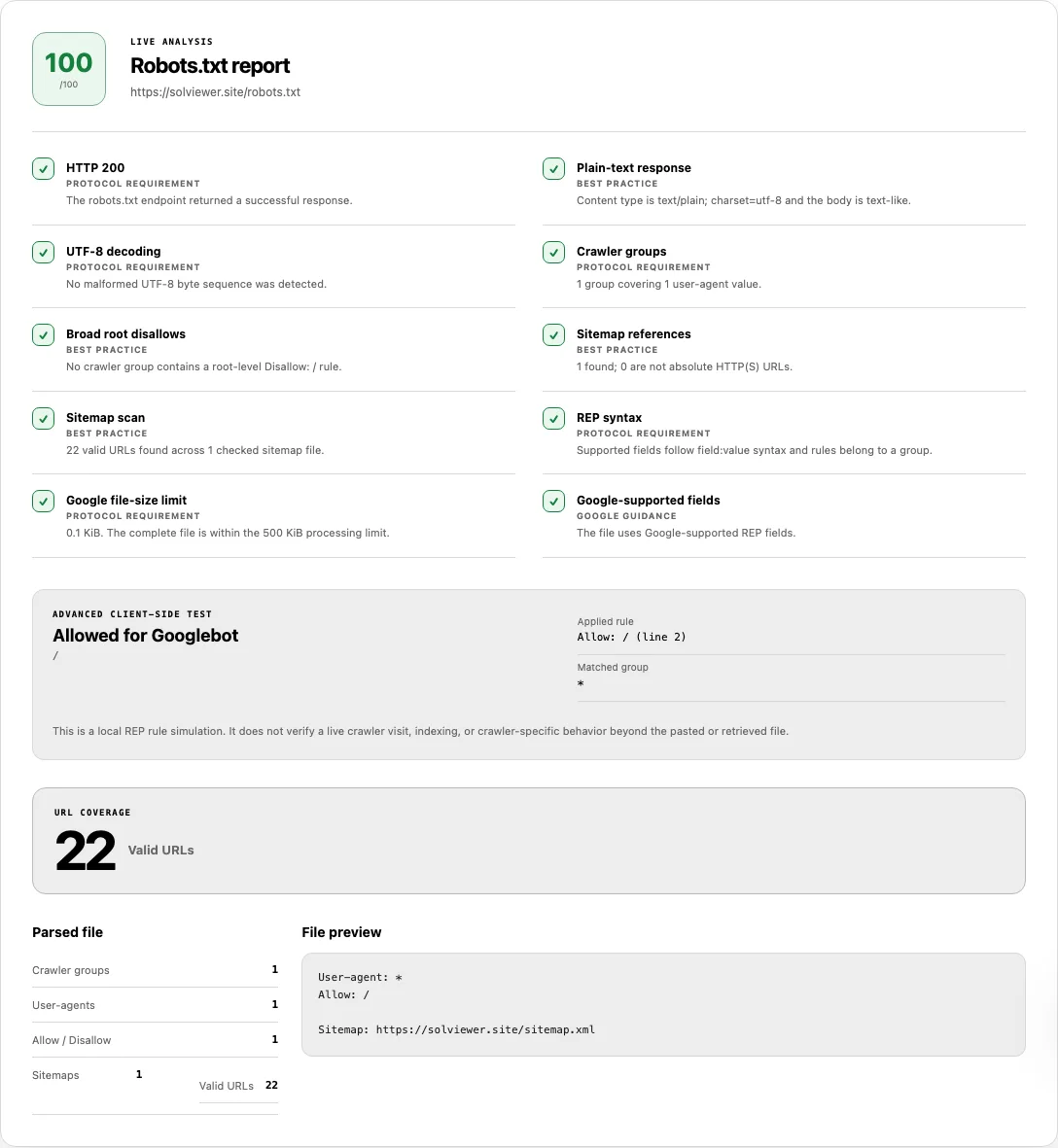
We requested https://solviewer.site/robots.txt on 23 September 2026. The endpoint returned HTTP 200 and 68 bytes:
User-agent: *
Allow: /
Sitemap: https://solviewer.site/sitemap.xml
For Googlebot on / the simulation was Allowed. Applied rule was Allow: / (line 2). That result is a longest-match reading of this file, not evidence that Googlebot visited the homepage.
Common problems and fixes
- Search still lists a URL you Disallow. Cause: robots.txt is a crawl hint, not an index-removal switch. Fix: keep the URL crawlable and use a noindex method a bot can read. Google’s robots.txt intro states this directly.
- You expected Disallowed, but Applied rule says Allowed. Cause: RFC 9309 picks the longest matching path, and an equal-length Allow wins the tie. Fix: read the line number on Applied rule and the Matched group, then adjust that group rather than a different User-agent block.
- Plain-text response fails because the body is HTML. Cause: origin
/robots.txtserved a styled 404 page or a homepage. Fix: serve a text file at the host root.User-agent: * Disallow: - Crawl-delay is in the file and Google still crawls quickly. Cause: Crawl-delay is not a Google-supported field. Fix: use Google-supported records, and treat Crawl-delay as ignored for Googlebot.
- Google file-size limit fails around 500 KiB. Cause: Google processes only the first 500 KiB. Fix: shorten the file; rules after the cutoff are not applied in this report.
- HTTP 404 looks like a block, or HTTP 503 looks like “no file”. Cause: Google treats most 4xx responses (not 429) as a missing file and unrestricted crawling; 5xx is a server error and can pause crawling while Google retries. Fix: return 200 with the intended rules, or 404 only when you truly want no robots file.
- A Sitemap line points at a page, not XML. Cause: the declaration is only a location. Fix: keep an absolute HTTP(S) sitemap URL, then validate it with the XML Sitemap Checker.
Why Google may still list a URL that robots.txt disallows
A Disallow rule asks compliant crawlers not to fetch that path. Google’s robots.txt intro states it is not a mechanism for keeping a page out of Google. Other sites can still link to the URL, and Google may show a listing with limited details when it could not crawl the document.
If the URL must stay out of search results, use a noindex directive on a response the crawler is allowed to retrieve, and remove the URL from sitemaps and internal links when you no longer want it discovered. Blocking the page in robots.txt can prevent Google from seeing that noindex tag.
Google Search Central retired the Search Console robots.txt tester on 15 November 2023 (announcement). This page is a local simulation of REP rules against the file we retrieved or you pasted. It does not replace URL Inspection, and it does not confirm that Googlebot fetched the path.
How this check works
URL mode requests /robots.txt on the origin of the address you entered, then parses User-agent groups and Allow/Disallow paths. Paste mode reviews the supplied text without that origin fetch.
The path test runs in your browser. It applies longest-match rules from RFC 9309: the longest matching path wins, and Allow wins an equal-length tie. Google’s robots.txt interpretation supplies the 500 KiB cutoff, 4xx versus 5xx handling, and the list of fields Google honors.
Live robots.txt is pulled with the same origin-request constraints used across SolViewer.
Frequently asked questions
How do I know if a URL is blocked by robots.txt?
Enter the URL, choose the crawler token, and read Applied rule. Allowed or Disallowed is a simulation against this file, not a log of a Googlebot visit.
Can robots.txt remove a page from Google?
No. It can discourage crawling. Removal from results needs an index directive the crawler can fetch, plus time and the search engine’s own processes.
Can this checker simulate Googlebot?
It can apply this file’s rules as if the User-agent were Googlebot (or another listed token). It cannot reproduce Googlebot’s full crawler, host load, or index selection.
Does a missing robots.txt block crawling?
No. A site is not required to publish one. Google treats a typical 4xx on the file as unrestricted crawling unless another control applies.
Does a Sitemap line prove the sitemap is valid?
No. It only names a location. Check that file separately with the XML Sitemap Checker.
Related tools
- XML Sitemap Checker — validate a sitemap named in robots.txt.
- SEO Checker — page-level noindex, canonical, and Googlebot access evidence on one URL.
- View Source — read the HTML a crawler would receive if robots.txt allows the fetch.
Public URL requests follow the shared fetch limits on the About page.