How to check Open Graph tags
- Enter the complete public webpage URL.
- Run Open Graph Checker.
- Compare the six approximate cards and the metadata coverage list.
- If a live network still shows an old image, use that platform’s official debugger. This checker cannot scrape again for you.
Reading your results
The report is titled Social share previews. As the report itself notes, each card is an approximate preview generated from the metadata in the server-rendered HTML.
Google uses <title> + meta description (titleLimit 60, descriptionLimit 160). X / Twitter prefers a Twitter Card, then Open Graph, then HTML. Facebook, LinkedIn, Slack, and Discord use Open Graph, then HTML.
Warnings you may see: “No meta description — Google may choose its own snippet.”; “No social description declared.”; “No og:image — linkedin preview will be text-only.” (the platform name changes per card); “Title may truncate after 60 characters.” (the number depends on the card)
View metadata coverage lists <title>, meta description, og:title, og:description, og:image, og:url, twitter:card, twitter:title, and twitter:image. When an image URL exists, the browser probes it with no-referrer: the label starts as “Checking image…” and becomes the measured size, such as 1200 × 630px, or “Image could not be loaded”.
These cards do not clear platform caches. For a live Facebook scrape use the Sharing Debugger. For LinkedIn use the Post Inspector.
Worked example
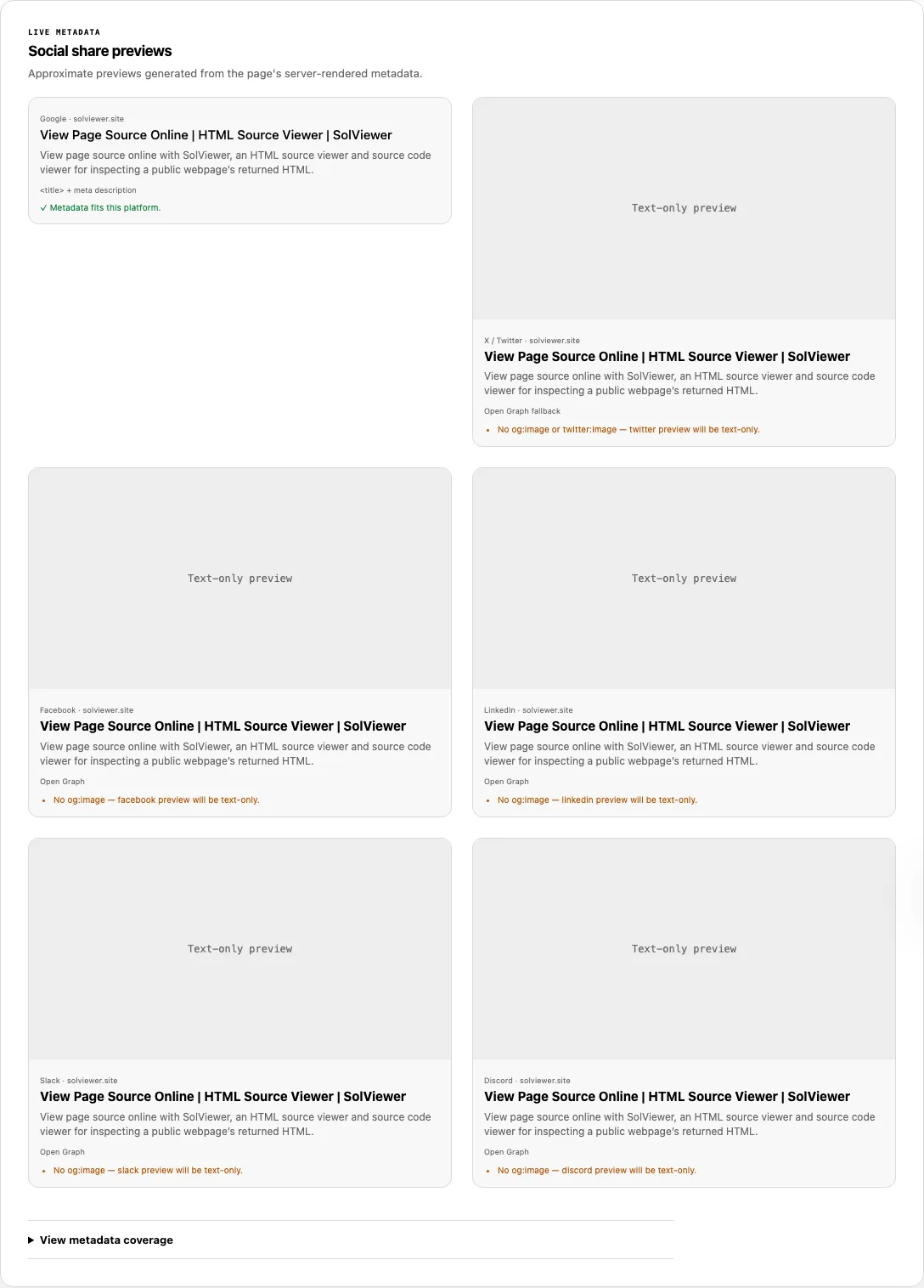
We checked https://solviewer.site/ on 23 September 2026. Coverage included og:title, og:description, og:url, og:type, and og:site_name. og:image and twitter:card were missing.
The Google card therefore drew on the 56-character title and 133-character meta description. Facebook, LinkedIn, Slack, and Discord cards were text-only in this preview, each with a warning such as “No og:image — facebook preview will be text-only.” X / Twitter had no twitter:card to prefer, so it fell back through Open Graph to HTML and was also text-only.
Common problems and fixes
- The card is text-only here. Cause: no og:image (and no twitter:image for X). Fix: add an absolute image URL in the server HTML.
<meta property="og:image" content="https://example.com/share.jpg"> - Facebook still shows an old image after you updated the tag. Cause: Facebook cached the previous scrape. Fix: this checker cannot refresh that cache. Use the Sharing Debugger and scrape again there.
- LinkedIn preview is not updating. Cause: LinkedIn also caches. Fix: run the Post Inspector on the public URL. A pass in SolViewer only means the current HTML has the new tags.
- The image row says “Image could not be loaded”. Cause: a relative URL the probe could not resolve, a hotlink block, or a file that is not an image. Fix: use an absolute HTTPS URL that allows an anonymous, no-referrer request. Facebook’s image sharing notes cover size and access rules.
- Google’s card ignores og:title. Cause: the Google preview is sourced from
<title> + meta description, not Open Graph. Fix: edit those HTML fields if the search-style card is the one you care about. - Title may truncate after N characters. Cause: each network has its own limit in this UI (Google 60, X 70, Facebook/LinkedIn/Slack 150, Discord 256). Fix: put the identifying words first; the warning is a length heuristic for this preview, not a live crop from the network.
- Tags appear in Inspect Element but not here. Cause: a client script injected them after load. Fix: print og tags in the HTML the server sends. Open Graph Checker does not run page JavaScript.
Why a Facebook, LinkedIn, or Slack card can differ from this preview
Each card here is built from tags in the HTML we retrieved, plus documented fallbacks. Facebook, LinkedIn, Slack, Discord, and X keep their own copies. If someone shared the URL last month, the live card can still be last month’s image even when this preview is current.
Platforms also crop, reject formats, and substitute a different image when their crawler is blocked. A Slack unfurl that works on a freshly pasted link can disagree with a Facebook post that was never rescraped. This checker does not log in to those networks and does not press “Scrape Again.”
Use the official Facebook Sharing Debugger and LinkedIn Post Inspector when the live card is the artifact you need to refresh. Use this page when you want to know whether the server HTML already has the four Open Graph required properties: og:title, og:type, og:image, and og:url.
How this check works
Open Graph Checker maps tags from the retrieved HTML into six approximate cards. Google uses title plus meta description; the other cards prefer Twitter Card or Open Graph fields, then fall back to HTML.
ogp.me requires og:title, og:type, og:image, and og:url. Image pixel sizes in this UI come from a no-referrer probe in your browser, not from a Facebook or LinkedIn crawl.
Share tags are parsed from HTML fetched under the SolViewer retrieval rules.
Frequently asked questions
Why is my Open Graph image not showing?
The HTML we retrieved has no usable og:image, or the image probe failed. Add an absolute image URL in the server response, then confirm “Checking image…” resolves to pixel dimensions.
Why does Facebook preview show the wrong image?
Often cache. Confirm og:image in this report, then scrape the URL in Facebook’s debugger. SolViewer cannot replace that step.
Why is my LinkedIn preview not updating?
LinkedIn reuses a stored card until you inspect the URL in Post Inspector. A correct tag here only proves the current HTML, not LinkedIn’s cache.
Does Open Graph control Google search snippets?
No. The Google card on this page is a layout of <title> and meta description. Search snippets follow other page signals and can be rewritten.
Why can Slack show a card when Facebook does not?
Different crawlers, caches, and image rules. Slack may unfurl a fresh paste while Facebook still holds an older scrape, or Facebook’s crawler may be blocked when Slack is not.
Related tools
- View Source — inspect the exact meta tags in the returned HTML.
- SEO Checker — Open Graph image response plus the rest of the on-page report.
- Robots.txt Checker — see whether a crawler group blocks the HTML or image URL a share bot needs.
Public URL requests follow the shared fetch limits on the About page.