How to check a description tag
- Use URL mode for a deployed page, or paste a draft summary.
- Submit Check Description.
- Confirm
Description is presentandDescription tag count. - Read
Desktop preview width,Mobile preview width, andSnippet directivesbefore editing copy.
Reading your results
The numeric score is editorial guidance. Google may still write a different snippet from page content.
Description is presentandDescription tag countreport what the HTML actually contains.Desktop preview widthuses a 920px guideline.Mobile preview widthuses a 680px guideline and states “Google has no fixed length limit.”Target keyword,Natural keyword use,Useful detail,Placeholder copy, andNatural languageare writing heuristics.Snippet directivessurfacesnosnippet,max-snippet:0, ormax-snippet:Nfrom meta robots, googlebot, orX-Robots-Tag.
Homepage description length
The description on https://solviewer.site/ is 133 characters. That count is from the tag in the HTML. We do not print pixel widths here because they were not measured in a browser for this write-up; run the checker if you need the Arial estimate.
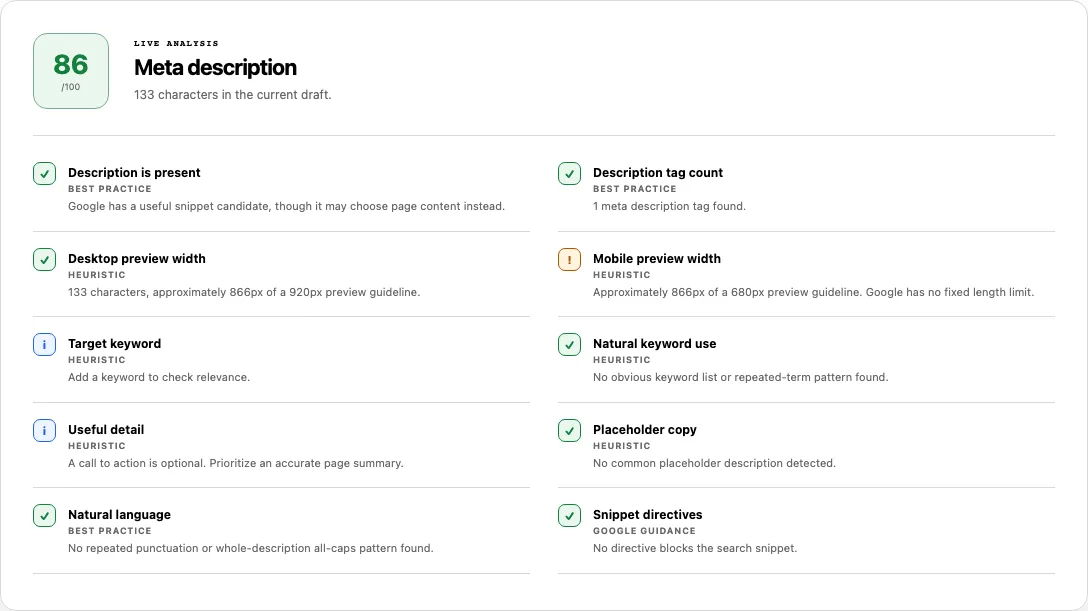
Common problems and fixes
- A 150–160 character target is treated as a law. Google truncates by available space on the device. Use the pixel guidelines as a writing aid, then write a specific summary rather than padding to a character quota.
- The live snippet ignores your tag. That can be a rewrite, a better-matching extract, or a directive. See Google’s snippet documentation.
- Snippet directives warn or fail.
nosnippetormax-snippet:0blocks a text snippet. Remove or relax the directive if you want a candidate shown. - The checker says the tag is missing. It may be absent, injected only after JavaScript, or sitting on a URL that redirected. Confirm the element in View Source.
- Two description tags fail the count check. Keep one
meta name="description"in the document the server returns. - Placeholder copy fails. Phrases such as “lorem ipsum” or “description goes here” should be replaced with a real summary of that page.
Pixels, not a character statute
Length checkers still lead with 150–160 characters. This report measures an Arial width against 920px on desktop and 680px on mobile. Those caps are heuristics. Google does not publish them as a law, and the snippet doc says the result is truncated to the device and is often taken from the page.
Snippet directives is the other gap this page covers: nosnippet and max-snippet can hide or shorten text even when the description tag looks fine. Google lists those rules in the robots meta / X-Robots-Tag spec.
How this check works
URL mode reads every meta name="description" in the returned HTML and combines robots, googlebot, and X-Robots-Tag values for snippet rules. Paste mode scores the draft you typed. Widths are an Arial canvas estimate, not a screenshot of Google. A URL check uses the shared SolViewer fetch policy.
We cannot predict a rewrite. Compare the candidate with the visible page, then verify important URLs in Search Console.
Frequently asked questions
Does Google always use my meta description?
No. Google may generate a snippet from page content when that extract better matches the query. Your tag is a candidate, not a contract.
Will Google rewrite the description?
It can. This checker does not forecast the rewrite. It reports the text and directives that are in the HTML you supplied or retrieved.
Is the 920px desktop width an official limit?
No. It is a preview guideline in this tool. Google has no fixed length limit for descriptions.
What do nosnippet and max-snippet do?
nosnippet prevents a text snippet. max-snippet:0 has the same effect for length. A positive max-snippet:N caps the generated snippet; -1 means no explicit maximum.
Related tools
- SEO Checker — review the description beside title, canonical, and robots evidence.
- Open Graph Checker — inspect
og:description, which is a social field, not the search snippet. - View Source — confirm the meta element in the returned HTML.
Public URL requests follow the shared fetch limits on the About page.