How to run an on-page SEO check
- Enter the complete public webpage URL.
- Run SEO Checker.
- Read the Core SEO score line, then each category and its basis label.
- Open a focused SolViewer tool only when a finding needs a dedicated view.
Reading your results
The report opens with the URL you checked and its Core SEO score. Each item carries a status: Passed, Warning, or Failed.
Score groups are Core SEO, Technical quality, Security / performance, and AI-search experimental. The published scope is: “Core SEO only; social, security, performance, discovery, and editorial heuristics are reported separately.”
Each item has a title and a basis: Protocol requirement, Google guidance, Heuristic, Best practice, or Experimental. Categories include Technical Response, SEO Basics, Document Structure, Content Signals, Open Graph & Social, Structured Data, Internationalization, Crawlability, Bounded Network Validation, Images, Links, Performance Hints, Security Headers, and Discovery Files.
Notable titles: HTTP status, Redirect path, X-Robots-Tag evidence, Title tag, Title display length (a 30–60 character heuristic), Meta description, Description display length, Canonical URL, Canonical target, Index directives, Googlebot page access, Hreflang return links (up to 8 alternates), Canonical response, Open Graph image response, and llms.txt (Experimental).
SEO Checker does not run page JS. It is not a ranking or indexation verdict and not a full security audit. If HowTo schema is present, the object is validated, but Google no longer shows HowTo rich results.
Worked example
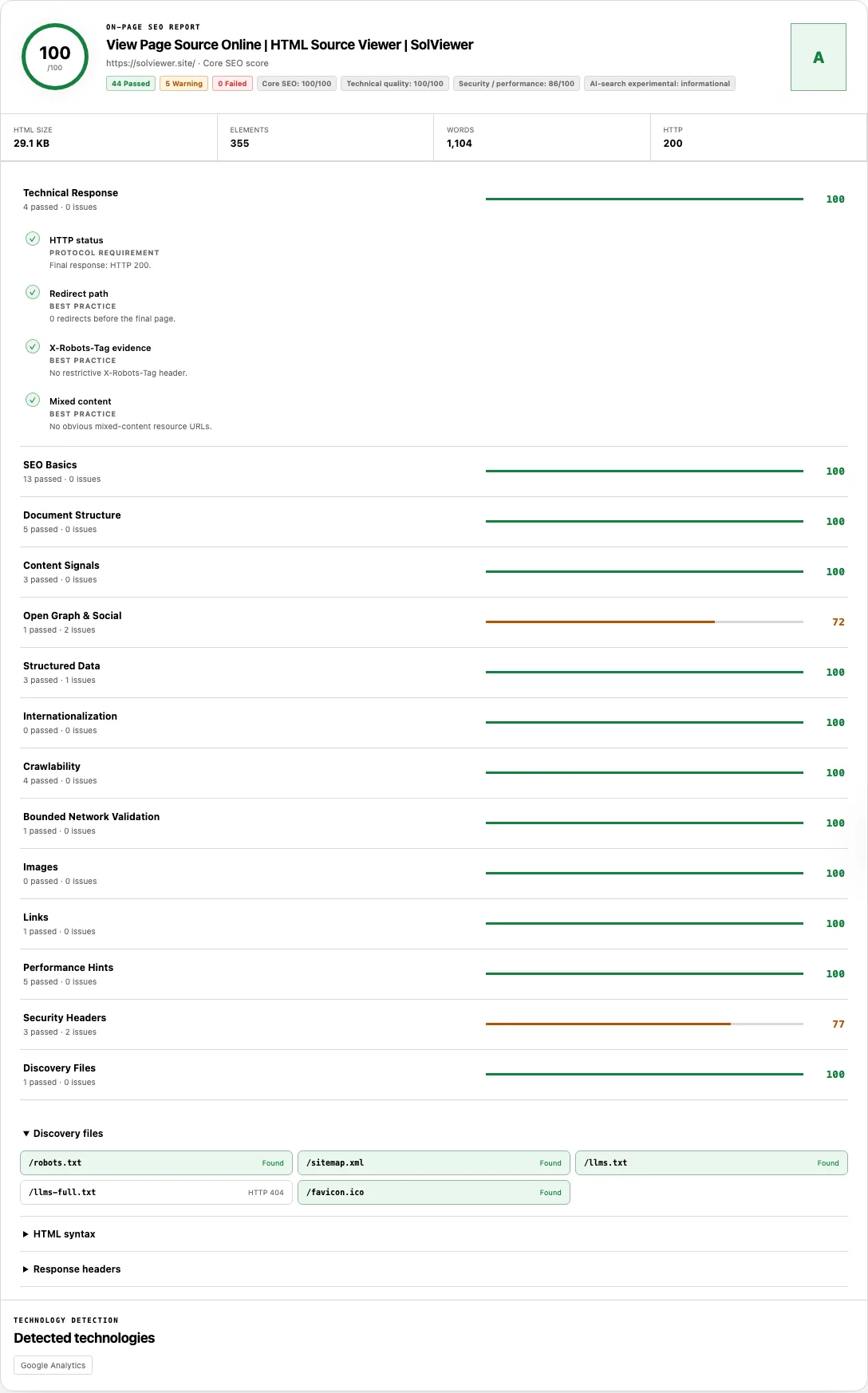
We checked https://solviewer.site/ on 23 September 2026. HTTP status was 200 with 0 redirects. Canonical URL was https://solviewer.site/, matching the final address. Index directives showed no noindex in meta robots or X-Robots-Tag evidence.
Title tag was present at 56 characters (“View Page Source Online | HTML Source Viewer | SolViewer”). Meta description was present at 133 characters. The document had one H1, lang=en, and a viewport. Structured Data listed 3 JSON-LD blocks.
Open Graph image was missing, and Twitter Card was missing, while other og fields were set. Security Headers showed x-content-type-options: nosniff and a referrer policy, and did not show HSTS, CSP, X-Frame-Options, Permissions-Policy, or COOP/COEP/CORP. Those header gaps sit outside Core SEO; they do not rewrite the canonical or noindex evidence above. We are not printing a numeric Core SEO score from this run.
Common problems and fixes
- Canonical target warns that the tag points elsewhere. Cause: the href is a valid URL but not the final page address. Fix: point the canonical at the document you want grouped, or confirm you intended a different target.
<link rel="canonical" href="https://example.com/preferred-url"> - Index directives fail with noindex. Cause: meta robots or X-Robots-Tag evidence includes
noindexornone. Fix: remove the directive from crawlable HTML and headers when the URL should be eligible. See Google’s robots meta tag documentation. - Title display length is a Warning at 22 or 72 characters. Cause: the 30–60 range is a Heuristic for typical display, not a Google limit. Fix: rewrite for clarity if the title is vague or truncated in your own tests; do not treat the band as a ranking rule.
- Open Graph image warns while Core SEO still looks healthy. Cause: social tags are scored outside Core SEO. Fix: add an absolute
og:imageif you care about share cards, and use the Open Graph Checker for previews. - Hreflang return links fail on some alternates. Cause: Google expects reciprocal annotations; this checker samples up to 8 alternates. Fix: make each language URL point back at the others, including self-references, as in the localized versions guide.
- HowTo search display warns even though JSON-LD parses. Cause: the object is checked as Schema.org data, but Google no longer shows HowTo rich results. Fix: keep the markup only if it helps your own tooling; it will not restore that rich result.
- Security / performance looks noisy on an otherwise clean page. Cause: HSTS, CSP, and similar headers are Best practice evidence, not Core SEO. Fix: read scoreScope and the basis label before treating a header gap as an on-page SEO failure.
How to read the basis labels
Protocol requirement means the check encodes a hard rule of HTTP, HTML, or a published protocol: a non-2xx HTTP status, a noindex token, JSON-LD that does not parse, or an hreflang code/URL that is malformed. A Failed item here is evidence in the response, not a prediction of rank.
Google guidance means the check follows public Search Central advice, such as a self-referencing canonical, a title element, or reciprocal hreflang. The page can still be valid HTML if you ignore the advice; the label tells you we are measuring that guidance, not inventing a secret ranking factor.
Heuristic means a local band we chose for display or coverage, including Title display length (30–60 characters) and Description display length. Best practice covers widely used engineering hygiene. Experimental is reserved for items such as llms.txt, which is optional and not a Google ranking input.
Hreflang return links is a bounded network sample: we fetch up to 8 declared alternates and look for a return annotation. A pass on that sample is not a full language-cluster crawl. Unchecked alternates can still be broken.
How this check works
SEO Checker parses the HTML returned for one public URL and does not run that page’s scripts, so client-injected tags are out of scope. Canonical, robots, and hreflang findings follow Google’s notes on duplicate-URL consolidation, robots meta tags, and localized versions.
Title and description lengths are compared with how Google generates snippets and stay labeled as heuristics. Bounded Network Validation may request the canonical target, a sample of hreflang URLs, and an og:image; those probes are not a site crawl or proof of indexation.
Returned HTML for this report is gathered under the About page fetch policy.
Frequently asked questions
What does noindex mean?
It is a request not to show that URL in search results, sent with meta robots or X-Robots-Tag. This checker reports the directive in the response. It cannot confirm that Google has dropped the URL.
What does a canonical that differs from the page URL mean?
Canonical target compares the tag with the final address we retrieved. A different href is a grouping signal, not automatic proof of a duplicate-content penalty. Confirm the target returns 200 and represents the preferred document.
Does SEO Checker crawl a whole website?
No. It inspects one URL’s returned HTML plus a few bounded probes. It is closer to a page report than to a site crawler or a browser extension that scores a rendered tab.
Can the Core SEO score predict rankings?
No. The number summarizes labeled checks in the Core SEO group. It is not a ranking forecast and not an indexation status.
How many hreflang return links does the checker fetch?
At most eight alternates. If you declare more, the sample can pass while an unchecked URL still lacks a return link.
Related tools
- View Source — read the HTML this report was built from.
- Robots.txt Checker — origin crawl rules and a per-URL Googlebot simulation.
- Open Graph Checker — share-card previews when social tags are the issue.
Public URL requests follow the shared fetch limits on the About page.