How to inspect response headers
- Type the public URL you want to inspect.
- Choose Check Headers.
- Start with the summary at the top of the report: a score out of 100 for the hostname, how many checks need attention, the number of redirects, and the final HTTP status.
- Open
Redirect chain, then the category groups, thenView raw response headersfor fields such asX-Robots-Tag.
Reading your results
The score line is a weighted presence check. It is not a letter-grade audit of the whole application.
ResponsecoversHTTP statusandRedirect path. HTTP 2xx is pass, 3xx is warn, anything else is fail. One hop or none is pass; two or three hops is warn; four or more is fail.TransportcoversHTTPSandHSTS. HSTS passes only whenmax-ageis at least 31536000.Content SecuritycoversContent-Security-Policy,Clickjacking protection(CSPframe-ancestorsorX-Frame-Options), andX-Content-Type-Options.Cross-Origin IsolationcoversCross-Origin-Opener-Policy,Cross-Origin-Embedder-Policy, andCross-Origin-Resource-Policy.Privacy & PolicycoversReferrer-PolicyandPermissions-Policy.Cookieslists anySet-Cookieheaders and runs theCookie flagscheck (Secure, HttpOnly, SameSite).Information DisclosurecoversServer headerandX-Powered-By.
Missing security fields are observations. They do not prove the site is unsafe, and present fields do not prove it is fully secure.
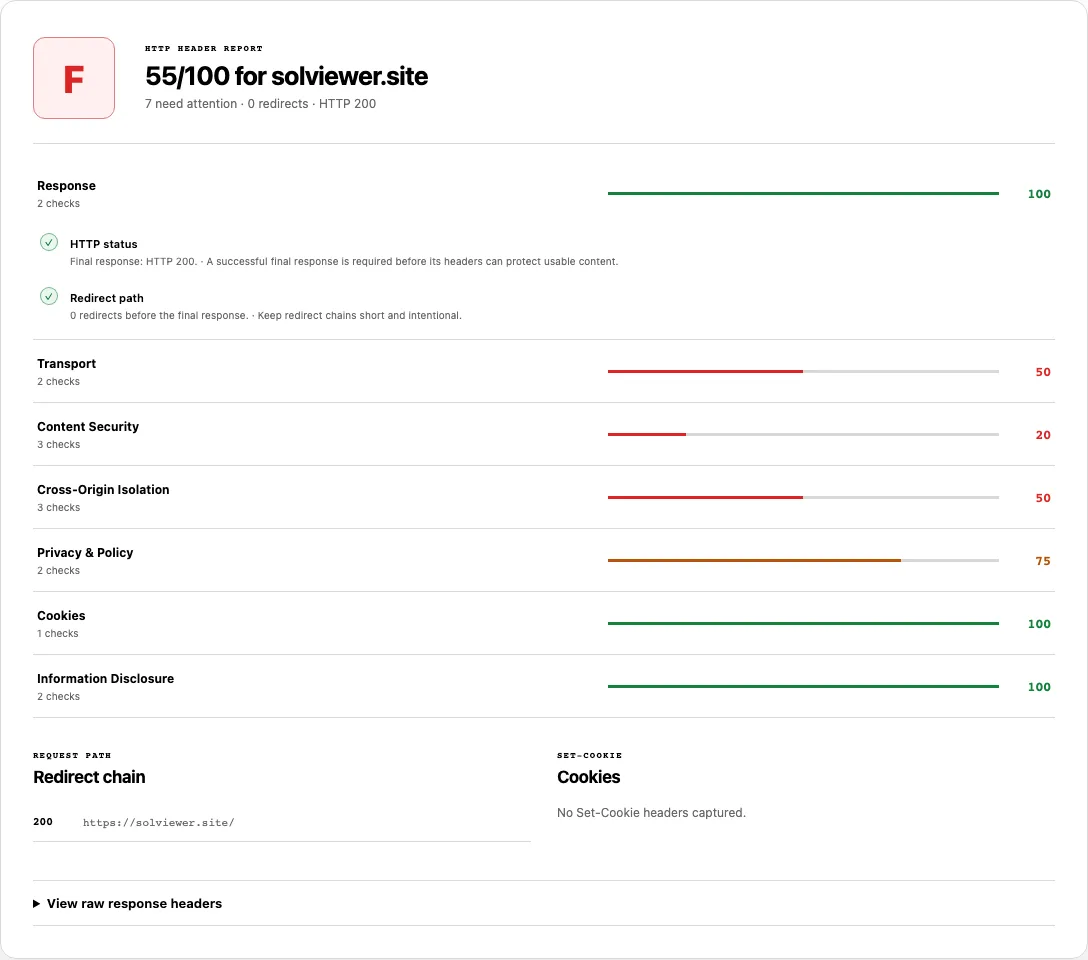
A public run of solviewer.site
On https://solviewer.site/ the final status was HTTP 200 with 0 redirects. X-Content-Type-Options: nosniff and a Referrer-Policy were present. HSTS, Content-Security-Policy, X-Frame-Options, Permissions-Policy, COOP, COEP, and CORP were absent. The Server value was cloudflare without a version. No cookies were set. No X-Robots-Tag was returned. We do not print a /100 figure here because that number is produced in the live report, not copied from memory.
Common problems and fixes
- The hop list is longer than you expected. Extra 301/302/307/308 steps often come from http→https, www, or trailing-slash rules stacked together. Point internal links at the final URL so crawlers do not walk the chain on every visit.
- HSTS is fail or warn. The header is missing, or
max-ageis below 31536000. AddStrict-Transport-Securityonly after the whole host serves HTTPS. - Clickjacking protection is fail. Neither
X-Frame-Optionsnor CSPframe-ancestorsis on the final response. Set one of them to match how you actually embed pages. - You cannot find X-Robots-Tag in View Source. That directive is a response header, not an HTML tag. Open
View raw response headerson this report, or compare it with the SEO Checker robots evidence. - A 200 still looks wrong in the browser. Status pass means the request succeeded. It does not mean the body is the page you wanted; confirm the HTML with View Source.
- The /100 line looks like a security grade. Treat missing CSP or HSTS as a configuration note. It is not a complete audit of auth, XSS, or infrastructure.
Hops, security fields, and X-Robots-Tag together
Most header tools either trace redirects or grade security fields. This report keeps both: Redirect chain lists every hop, the categories grade the final response, and View raw response headers shows X-Robots-Tag when the server sent it.
Google documents robots rules on that header in the robots meta tag specification. Presence of noindex there is evidence on this response. It is not proof the URL is out of the index.
How this check works
We request the URL, record each redirect hop, then read the headers on the final response. Status and hop-count tones follow the rules above. Security categories flag whether a field is present and, for HSTS, whether max-age meets the one-year threshold. Cookie flags are parsed from Set-Cookie. We retrieve one public URL under the request limits on About.
Field names and meanings are defined in MDN’s HTTP headers reference. Use that document when a raw value looks unfamiliar.
Frequently asked questions
How do I check the redirect chain for a URL?
Run this checker and read the Redirect chain list. Each row is a status plus the hop URL. The summary line also prints the hop count beside the final HTTP status.
How many redirects are acceptable?
This tool treats zero or one hop as pass, two or three as warn, and four or more as fail. That band is a review heuristic. A single intentional move to HTTPS can be fine; a four-step loop is worth fixing.
How is this different from a Secure Headers test?
A dedicated security grader often stops at CSP, HSTS, and related fields. Here you also get the hop list and the raw header dump, so you can see X-Robots-Tag on the same response. Neither product is a pentest.
Can I check security headers after redirects?
Yes. Categories are scored on the final response, after hops are followed. Open the chain if you need to see an intermediate URL’s status, then read HSTS, CSP, and the other groups on the destination.
Related tools
- View Source — read the HTML body that arrived with these headers.
- SEO Checker — combine header robots evidence with title, canonical, and on-page tags.
- Robots.txt Checker — test crawl rules in
/robots.txt, which is a different control fromX-Robots-Tag.
Public URL requests follow the shared fetch limits on the About page.